✓ Royal Mail Authorised Inspector since 2008 | Trading since 2005


Parcel Shipping Presets Support
Mailcoms Support · Parcel Shipping
How to create and use presets to speed up repeat Parcel Shipping labels on your Mailcoms franking machine.
⚡ Save on supplies
Franking machine ink, labels & supplies
Genuine Mailcoms, Royal Mail approved ink, labels and supplies for your franking machine - quality you can trust at Mailcoms prices. Free UK delivery on orders over £40.
Creating a Parcel Shipping preset
Create presets to store commonly-used parcel information. Presets are ideal for repeat parcels that use the same attributes such as weight, dimensions, carrier and class services. You can create up to eight presets.
1. Once you print a label it appears in the Recents screen of Parcel Shipping.
2. Tap the “star” on the label you have printed.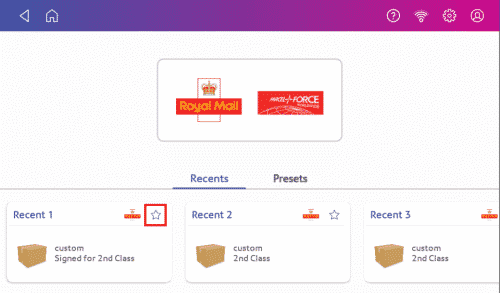
3. Enter the name of the preset in the Name Preset field.
4. Tap the “green tick”.
5. Tap “Save”.
Parcel Shipping Presets Support – Frequently Asked Questions
What is a Parcel Shipping preset?
A preset stores commonly-used parcel details such as weight, dimensions, carrier and class, ideal for repeat parcels. You can create up to eight.
How do I create a Parcel Shipping preset?
After printing a label, tap the star on it in the Recents screen, enter a preset name, tap the green tick and Save.
How many Parcel Shipping presets can I have?
You can create up to eight presets.
Need help with Parcel Shipping presets?
Our technical team are Royal Mail Authorised Inspectors and fully qualified franking machine engineers. Call us on 01543 572 776 – Mon–Fri 9:00 to 17:00.